AWS · terminal · read-only
Browse your AWS accounts without leaving the terminal.
65 services behind one fuzzy search, console-style detail panes, live log tailing, CloudWatch charts, and links you can follow across services and regions. It issues only describe, list and get calls — nothing it does can change your account.
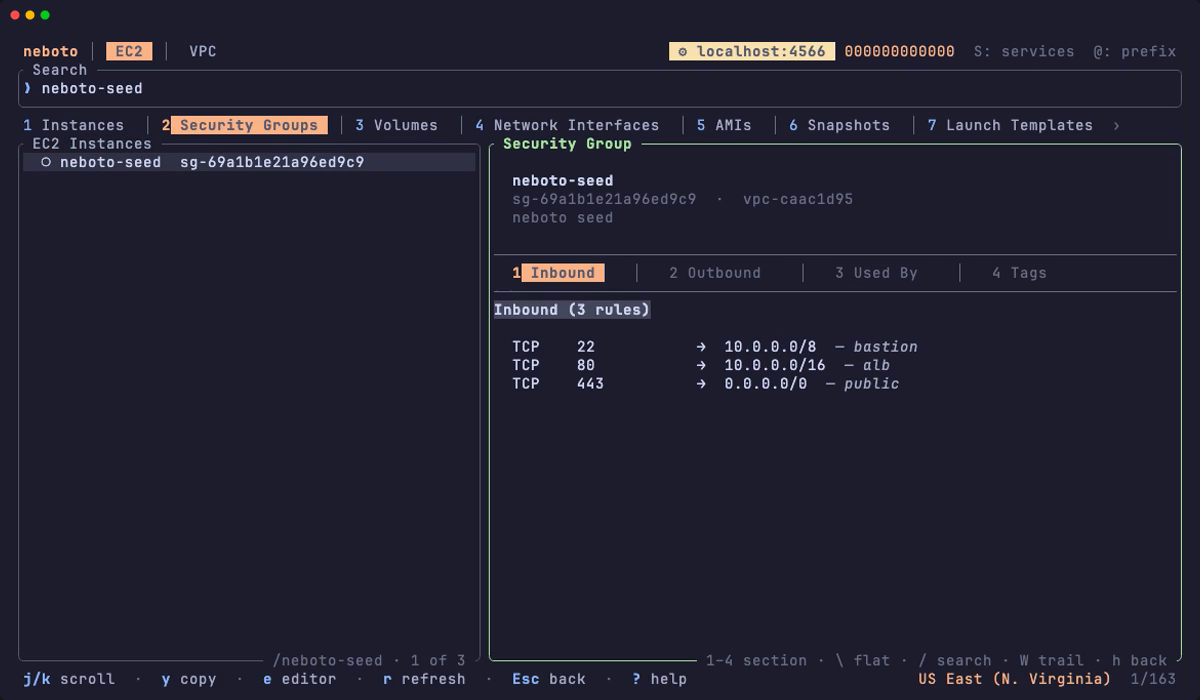
curl -fsSL https://raw.githubusercontent.com/neboto/neboto-tui/main/install.sh | shRecorded against a local AWS emulator, hence the ⚙ localhost:4566 badge. Nothing on screen is a real account.
What you get
- 65 services, one search.
@ec2 web,@sh,@orgs— an@prefixswitches service and fuzzy-matches the rest against ids, names, IPs, CIDRs, tags and ARNs. Multi-resource services get numbered sub-tabs. - Console-style detail panes. Fixed header, section tabs, scrollable body, on roughly 160 resource types. Expensive sections load lazily the first time you look.
- Follow the links. Enter on any ARN, id or reference jumps to that resource — across services and even across regions. Tracing a dependency chain is faster here than in the Console.
- Logs and metrics in place. t tails CloudWatch logs live, f runs a server-side log search, m charts the right namespace and dimensions for 53 resource kinds.
- “Who changed this?” W opens a CloudTrail lens on any resource, merged with alarm history, stack events and deployments.
- Multi-account, safely. Switch profiles with P, or assume into an Organizations member account with s — every assumed session is pinned to a
ReadOnlyAccesssession policy. - Watch, record, export. w auto-refreshes without the list ever blanking, , records a navigation routine you can replay with one key, X exports JSON, CSV and Markdown.
- Your colours. Ten theme presets, light and dark, plus per-colour overrides. This site uses the same catppuccin-mocha palette as the recording.
One resource, every angle
A security group's inbound rules, the interfaces that use it, and a link back to each instance — one pane, no tab-hopping.
Read-only is the point
Every assumed cross-account session is pinned to the AWS-managed ReadOnlyAccess session policy, and the full IAM footprint is documented action by action in PERMISSIONS.md. Security teams can approve it because it cannot mutate. When you do want to change something, C copies the ready-to-run AWS CLI command for the selected resource, region and ids filled in.